Incredible technology to build a 3D model from a video of the desired object. Just watch the video:
You can go to the project site for more details.
Wednesday, November 25, 2009

Friday, October 02, 2009
Image Downscaling
A few days ago, a friend contacted me because he needed good image downscaling for a project he's working on.
I remebered reading an article about the types of issues when downsampling an image (and specifically a difficult one). After a few tests, I settled for a gaussian pre-blur.
I think I got pretty good results:
 Go to the original article to get the source image.
The code also tries to fit and center the image in the target. That means it will return an image with the exact size you request. It will center and rescale the source image and leav transparent background for filler space.
I remebered reading an article about the types of issues when downsampling an image (and specifically a difficult one). After a few tests, I settled for a gaussian pre-blur.
I think I got pretty good results:

The code also tries to fit and center the image in the target. That means it will return an image with the exact size you request. It will center and rescale the source image and leav transparent background for filler space.
import javax.imageio.ImageIO;
import java.awt.*;
import java.awt.geom.AffineTransform;
import java.awt.image.*;
import java.io.File;
import java.io.IOException;

public class FitImage {

 public static BufferedImage fitImage(final BufferedImage input, final int width, final int height) {
  final int inputWidth = input.getWidth();
  final int inputHeight = input.getHeight();

  final double hScale = width/(double)inputWidth;
  final double vScale = height/(double)inputHeight;

  final double scaleFactor = Math.min(hScale, vScale);

  //Create a temp image
  final BufferedImage temp = new BufferedImage(inputWidth,inputHeight, BufferedImage.TYPE_INT_ARGB);

  if(scaleFactor < 1) {
   //Create a gaussian kernel with a raduis proportional to the scale factor and convolve it with the image
   final Kernel kernel = make2DKernel((float) (1 / scaleFactor));
   final BufferedImageOp op = new ConvolveOp(kernel);
   op.filter(input, temp);
  } else {
   temp.createGraphics().drawImage(input, null, 0,0);
  }


  final BufferedImage output = new BufferedImage(width,height, BufferedImage.TYPE_INT_ARGB);
  final Graphics2D g = output.createGraphics();
  g.setRenderingHint(RenderingHints.KEY_ALPHA_INTERPOLATION, RenderingHints.VALUE_ALPHA_INTERPOLATION_QUALITY);
  g.setRenderingHint(RenderingHints.KEY_INTERPOLATION, RenderingHints.VALUE_INTERPOLATION_BICUBIC);
  g.setRenderingHint(RenderingHints.KEY_DITHERING, RenderingHints.VALUE_DITHER_ENABLE);
  g.setRenderingHint(RenderingHints.KEY_RENDERING, RenderingHints.VALUE_RENDER_QUALITY);
  g.setRenderingHint(RenderingHints.KEY_ANTIALIASING, RenderingHints.VALUE_ANTIALIAS_ON);

  final int xOffset = (int) Math.max(0, (width - inputWidth * scaleFactor) / 2);
  final int yOffset = (int) Math.max(0, (height - inputHeight * scaleFactor) / 2);
  final AffineTransform scaleInstance = AffineTransform.getScaleInstance(scaleFactor, scaleFactor);
  final AffineTransformOp transformOp = new AffineTransformOp(scaleInstance, AffineTransformOp.TYPE_BICUBIC);
  g.drawImage(temp, transformOp, xOffset, yOffset);
  return output;
 }

 public static Kernel make2DKernel(float radius) {
  final int r = (int)Math.ceil(radius);
  final int size = r*2+1;
  float standardDeviation = radius/3; //Guess a standard dev from the radius

  final float center = (float) (size/2);
  float sigmaSquared = standardDeviation * standardDeviation;

  final float[] coeffs = new float[size*size];

  for(int x = 0; x < size; x++ ) {
   for(int y = 0; y < size; y++ ) {
   double distFromCenterSquared = ( x - center ) * (x - center ) + ( y - center ) * ( y - center );
   double baseEexponential = Math.pow( Math.E, -distFromCenterSquared / ( 2.0f * sigmaSquared ) );
   coeffs[y*size+x]= (float) (baseEexponential / (2.0f*Math.PI*sigmaSquared ));
   }
  }

  return new Kernel(size, size, coeffs);
 }

 public static void main(String[] args)
  throws IOException
 {
  BufferedImage out = fitImage(ImageIO.read(new File("Rings1.gif")), 200, 200);
  ImageIO.write(out, "png", new File("test.png"));
 }


}
Tuesday, February 03, 2009
Great Quotes
"My definition of an expert in any field is a person who knows enough about what's really going on to be scared." - P. J. Plauger, Computer Language, March 1983
From Stackoverflow.
Tuesday, August 12, 2008
Phrase of the Day
"The devil is in the details, but exorcism is in implementation, not theory." - (author unknown)
Wednesday, February 06, 2008
Juggling Chainsaws
Andrew writes probably one of the funniest and most elocuent articles I've read about thread programming. His opening line:
Truly summarizes the feeling when you've had to deal with a multithreaded system. He argues that probably one of the most difficult thing to achieve is "avoiding doing nothing". I agree with his thoughts in the sense that if you are even considering multithreading something, you are trying to achieve maximum utilization (i.e. not wasting resources). But I'm not sure that getting maximum utilization is the hardest part by itself.
Besides the usual problems, like avoiding deadlocks or protecting shared data, I always found that the hardest part was, to paraphrase Andrew, "avoid doing something".
What I mean is that in multithreaded applications (it also applies to distributed applications), probably the hardest part is coming up with ways to avoid needing synchronization.
At least in my experience, figuring out ways to make the system exhibit consistent and predictable behavior without relying on atomicity, has always been the part that most of the design effort is invested in, and if done properly, where the greatest gains in scalability is achieved.
Take for example the Google File System, a massive, multi-petabyte storage filesystem. It is designed to work on clusters of several thousand machines, distibuted across several datacenters (even on different countries).
To achieve the expected performance, they had to throw away the usual file semantics, and think completely out-of-the box. But don't take my word for it, go, fetch the paper (if you haven't already done so), and read it yourself.
Writing multithreaded code is like juggling chainsaws; amazing when it works and truly sucky when it doesn't.
Truly summarizes the feeling when you've had to deal with a multithreaded system. He argues that probably one of the most difficult thing to achieve is "avoiding doing nothing". I agree with his thoughts in the sense that if you are even considering multithreading something, you are trying to achieve maximum utilization (i.e. not wasting resources). But I'm not sure that getting maximum utilization is the hardest part by itself.
Besides the usual problems, like avoiding deadlocks or protecting shared data, I always found that the hardest part was, to paraphrase Andrew, "avoid doing something".
What I mean is that in multithreaded applications (it also applies to distributed applications), probably the hardest part is coming up with ways to avoid needing synchronization.
At least in my experience, figuring out ways to make the system exhibit consistent and predictable behavior without relying on atomicity, has always been the part that most of the design effort is invested in, and if done properly, where the greatest gains in scalability is achieved.
Take for example the Google File System, a massive, multi-petabyte storage filesystem. It is designed to work on clusters of several thousand machines, distibuted across several datacenters (even on different countries).
To achieve the expected performance, they had to throw away the usual file semantics, and think completely out-of-the box. But don't take my word for it, go, fetch the paper (if you haven't already done so), and read it yourself.
Monday, November 05, 2007
A better way to do concurrent programming (Part 1)
A while ago (I think round 2005), some guys from Microsoft Research published a paper about Composable Memory Transactions.
After reading it, I began doing a small implementation in Java (quite ugly, btw), and I was astonished by the possibilities. So quite naturally (being the geek I am), I started toying with the idea of implementing a set of extensions for Java.
In this and other posts, I'll try to make an introduction to the basic idea. Note that I will probably change existing posts quite often to correct mistakes or ommissions. In this post I'll focus on an overview of the basic idea, in a future post I'll address composition of transactions (the C in CMT), static checking for side effects, and alternatives to implement the runtime part of this. If you're really curious, I recommend reading the original paper.
The gist of the idea is to replace common locking based semantics with in-memory transactions, so instead of writing complex locking semantics, you rely on optimistic locking handled by the runtime.
The following example shows how a producer-consumer problem can be solved with a queue of fixed size using Java with CMT:
Take a look at two keywords: atomic and retry
The atomic keyword demarcates a transaction. That means that this block is all-or-nothing (well get to the else later). For example let's take a closer look at the
The atomic statement starts a transaction. In this transaction we first check to see if the list is empty. If it is, we issue a retry statement.
The retry statement, rolls-back all changes and suspends the transaction until at least one of the fields used in the block (either directly or indirectly) is modified by another transaction committing. When this happens, the execution is restarted in a new transaction at the beginning of the enclosing atomic block.
If this time the list is not empty, the first element is removed from the list, and the transaction is committed. If at the time of the commit there is a conflict with another transaction, the execution is rolled back and retried.
Note that it is very important that the atomic blocks do not have side-effects (such as creating files, etc.) outside of the control of the transaction manager.
(to be continued...)
After reading it, I began doing a small implementation in Java (quite ugly, btw), and I was astonished by the possibilities. So quite naturally (being the geek I am), I started toying with the idea of implementing a set of extensions for Java.
In this and other posts, I'll try to make an introduction to the basic idea. Note that I will probably change existing posts quite often to correct mistakes or ommissions. In this post I'll focus on an overview of the basic idea, in a future post I'll address composition of transactions (the C in CMT), static checking for side effects, and alternatives to implement the runtime part of this. If you're really curious, I recommend reading the original paper.
The gist of the idea is to replace common locking based semantics with in-memory transactions, so instead of writing complex locking semantics, you rely on optimistic locking handled by the runtime.
The following example shows how a producer-consumer problem can be solved with a queue of fixed size using Java with CMT:
public class BufferedQueue {
    private LinkedList list;
    public BufferedQueue() {
        list = new LinkedList();
    }
    public Object consume() {
        Object value;
        atomic {
            if(list.isEmpty()) {
                retry;
            }
            value = list.removeFirst();
        }
        return value;
    }
    public void produce(Object value) {
        atomic {
            if(list.size() > 10) {
                retry;
            }
            list.add(value);
        }
    }
    public Object peek() {
        Object value;
        atomic {
            if(list.isEmpty()) {
                retry;
            }
            value = list.getFirst();
        } else {
            value = null;
        }
        return value;
    }
}
Take a look at two keywords: atomic and retry
The atomic keyword demarcates a transaction. That means that this block is all-or-nothing (well get to the else later). For example let's take a closer look at the
consume method.
public Object consume() {
    Object value;
    atomic {
        if(list.isEmpty()) {
            retry;
        }
        value = list.removeFirst();
    }
    return value;
}
The atomic statement starts a transaction. In this transaction we first check to see if the list is empty. If it is, we issue a retry statement.
The retry statement, rolls-back all changes and suspends the transaction until at least one of the fields used in the block (either directly or indirectly) is modified by another transaction committing. When this happens, the execution is restarted in a new transaction at the beginning of the enclosing atomic block.
If this time the list is not empty, the first element is removed from the list, and the transaction is committed. If at the time of the commit there is a conflict with another transaction, the execution is rolled back and retried.
Note that it is very important that the atomic blocks do not have side-effects (such as creating files, etc.) outside of the control of the transaction manager.
(to be continued...)
13949712720901ForOSX - Java for OSX
In a blog post henry resumes the sad state of affairs of Java in OSX.
So here I am, joining this campaign by posting this entry in protest! Apple, please don't let us down!
So here I am, joining this campaign by posting this entry in protest! Apple, please don't let us down!
Thursday, June 15, 2006
How the Wii-mote works
I know this is pure speculation, but I've been following the Revolution/Wii for a while, and one thing that kept me intrigued is how would Nintendo build such a fantastic controller in a cost effective manner.
After much thought I think I get it.
There are two distinct control schemes in the Wii-mote:
After much thought I think I get it.
There are two distinct control schemes in the Wii-mote:
- Orientation and acceleration
- Pointing
Orientation and Acceleration
The orientation and acceleration is quite easy, it only needs an accelerometer. This only tells you the orientation relative to the ground (if you're swinging, the 'perceived' ground shifts).
Pointing
This is the hard part.
There are some observations I (and several others) made:
- The Wii-mote has a dark plastic window in the front
- You have to place a 'Sensor Bar' under or over the TV
- The Wii can track multiple remotes with high acuracy
- There is an image sensor in the remote
- It has been mentioned of a problem with halogen lights
- The remote has to be pointed to the sensor bar for precision aiming
Keeping those in mind, let me explain how it all makes sense:
First of all, the dark window in the wii-mote, is a visible-light filter. Very similar to the window in front of most remote controls. But instead of having a IR led behind it, it has an image sensor.
This image sensor only 'sees' infrared images, probably in fairly low resolution. It uses this to see the sensor bar, which is basically a row of IR leds.
The wii-mote captures an image of what's in front of it (basically a bright line on a dark background), and looks for the sensor bar (which should be the brightest IR thing in the image).
Since the size of the sensor bar is fixed, you can acurately calculate the distance of the wii-mote from the sensor bar, the rotation (the image sensor sees a line rotated), and the angle of the wii-mote in relation to the center of the sensor bar (the line is off-center in the image).
This approach is quite easy to implement, but it has several drawbacks:
- If you are too close to the bar, you cannot acurately estimate the angle or position
- If you are too far, the precision also suffers, since the resolution of the image sensor limits how far you can be
- Halogen lights (or any other light source with lots of IR light, such as direct sunlight) can effectively blind the image sensor
It also is very cost effective since low resolution image sensors are quite cheap in bulk, and image tracking is also very well understood for this scenario (think of optical mice, for example).
Hope you enjoyed this.
Thursday, September 01, 2005
Quote of the day
"Puctuality is the virtue of the bored"
- Evelyn Waugh
(given that I seem to be unable to blog about something more interesting, I'll keep it simple)
- Evelyn Waugh
(given that I seem to be unable to blog about something more interesting, I'll keep it simple)
Thursday, August 25, 2005
Quote of the day
"... You are free to fold, spindle or mutilate for the betterment of your proprietary closed-source product that makes you zillions of dollars, without penalty ..."
from Drools Licensing.
Talking about Drools' liberal open source license. LOL!
from Drools Licensing.
Talking about Drools' liberal open source license. LOL!
Friday, August 19, 2005
Fixed and Floating point for J2ME
As you probably know, J2ME in its most basic form doesn't support floating point operations. This can be a problem if you are trying to develop games for it.
I've been looking around for alternatives, and found that most sites reference you to MathFP (the link I had seems to be broken, google for it), which is a fast library to do fixed point math. The problem with it is that for certain types of calculations, fixed point can be complicated, given that it is hard to represent numbers that are too small or too large, and mix those in the same calculation.
Browsing around I found MicroFloat, which is a very nice floating point library written entirely in Java. The only gotcha is that it requires long support from the KVM.
There are other libraries around (which I havent tested) such as Real Java.
Well, now to start that doom clone for my cell phone...
I've been looking around for alternatives, and found that most sites reference you to MathFP (the link I had seems to be broken, google for it), which is a fast library to do fixed point math. The problem with it is that for certain types of calculations, fixed point can be complicated, given that it is hard to represent numbers that are too small or too large, and mix those in the same calculation.
Browsing around I found MicroFloat, which is a very nice floating point library written entirely in Java. The only gotcha is that it requires long support from the KVM.
There are other libraries around (which I havent tested) such as Real Java.
Well, now to start that doom clone for my cell phone...
Monday, August 08, 2005
Impressive DOM scripting
If you happen to have a few minutes of spare time, check out "Interactive DOM Scripting" which is simply awesome.
The most impressive pages are IE only (don't blame me). This site has the spirit of the old demos built for machines such as the Commodore Amiga 500. A bit of nostalgia is unavoidable.
The most impressive pages are IE only (don't blame me). This site has the spirit of the old demos built for machines such as the Commodore Amiga 500. A bit of nostalgia is unavoidable.
Thursday, August 04, 2005
Quote of the day
"In a perfect world, reading code would be like reading a book. Unfortunately, code is written for computers to execute, not for humans to read. You can’t just read code from start to finish—they’re like those choose-your-own-ending books, forcing you to go all over the place to figure out how not to kill your main character. "
From Successful Strategies for Commenting Code - By Ryan Campbell
The quote is great, but I disagree with some of the statements in the article. I'm more of the idea that code comments should explain why you are doing something, not how. Anyway, as with any imperative guidelines, it is more important the spirit of the law, than the law itself.
In spirit, I think the idea of code comments is to make code more understandable for other people or for a future version of yourself.
From Successful Strategies for Commenting Code - By Ryan Campbell
The quote is great, but I disagree with some of the statements in the article. I'm more of the idea that code comments should explain why you are doing something, not how. Anyway, as with any imperative guidelines, it is more important the spirit of the law, than the law itself.
In spirit, I think the idea of code comments is to make code more understandable for other people or for a future version of yourself.
Tuesday, August 02, 2005
Not much time left
It has been a while since my last post, I've been really busy lately because a new version of our product is in the pipeline, and development is picking up speed.
I'll continue the regular posts soon (hopefully!).
I'll continue the regular posts soon (hopefully!).
Wednesday, July 20, 2005
Intersecting a QuadCurve2D (Part II)
(continued from part one)
So far we have the parametric equation of quadratic bezier curve:
Q(t) = P1 (1 - t)^2 + P2 (2t(1-t)) + P3 (t^2)
All we have to do now is devise an efficient way to check the intersection with a rectangle. We have three cases of intersection:
The second one is a bit trickier. First, let me make one observation: the sides of a rectangle are always parallel to one of the coordinate axis (I know this sounds obvious in this context, but bear with me).
What this means is that the top and bottom edges of the rectangle are contained by a line of the form:
y = c
with c = rect.getY() for the top edge and c = rect.getY() + rect.getHeight() for the bottom edge.
Analogously, the left and right edges:
x = c
with c = rect.getX() for the left edge and c = rect.getX()+rect.getWidth() for the right edge.
Let's use the top edge as an example, to check if the curve cuts that edge, we must do two checks:
So far we have the parametric equation of quadratic bezier curve:
Q(t) = P1 (1 - t)^2 + P2 (2t(1-t)) + P3 (t^2)
All we have to do now is devise an efficient way to check the intersection with a rectangle. We have three cases of intersection:
- If one of the endpoints of the curve is contained in the rectangle, the curve intersects the rectangle
- If the curve intersects one of the line segments that delimit the rectangle, the curve intersects the rectangle
- If neither of these is true, there is no intersection.
The second one is a bit trickier. First, let me make one observation: the sides of a rectangle are always parallel to one of the coordinate axis (I know this sounds obvious in this context, but bear with me).
What this means is that the top and bottom edges of the rectangle are contained by a line of the form:
y = c
with c = rect.getY() for the top edge and c = rect.getY() + rect.getHeight() for the bottom edge.
Analogously, the left and right edges:
x = c
with c = rect.getX() for the left edge and c = rect.getX()+rect.getWidth() for the right edge.
Let's use the top edge as an example, to check if the curve cuts that edge, we must do two checks:
- That exists a value of t, such as 0 <= t <= 1 and c = Qy(t)
- And that rect.getX() <= Qx(t) <= rect.getX() + rect.getWidth() is true for that value of t
Where Qx(t) and Qy(t) are the parametric ecuations of the curve for each coordinate:
Qx(t) = Px1 (1 - t)^2 + Px2 (2t(1-t)) + Px3 (t^2)
Qy(t) = Py1 (1 - t)^2 + Py2 (2t(1-t)) + Py3 (t^2)
To perform the aforementioned checks, we must solve t for:
c = Q(t)
(since Qx(t) and Qy(t) are analogous, I won't specify which one I'm referring , since the result is the same).
That yields (after some more mathemagic passes):
(P1 - 2 P2 + P3)t^2 + (2 P2-2 P1) t + (P1 - c) = 0
Which is a simple quadratic equation. As you know, quadratic equations have (potentially) two roots. So we must check both values (if present) to see if any of those yields the expected result.
To solve it in code, we can use the handy QuadCurve2D.solveQuadratic() method.
public boolean curveIntersects(QuadCurve2D curve, double rx, double ry, double rw, double rh)
  {
      /**
       * A quadratic bezier curve has the following parametric equation:
       *
       * Q(t) = P0(1-t)^2 + P1(2t(1-t)) + P2(t^2)
       *
       * Where 0 <= t <= 1 and P0 is the starting point, P1 is the control point and
       * P2 is the end point.
       *
       * Therefore, the equations for the x and y coordinates are:
       *
       * Qx(t) = Px0(1-t)^2 + Px1(2t(1-t)) + Px2(t^2)
       * Qy(t) = Py0(1-t)^2 + Py1(2t(1-t)) + Py2(t^2)
       *
       *  0 <= t <= 1
       *
       * A bezier curve intersects a rectangle if:
       *
       *  1 - Either one of its endpoints is inside of the rectangle
       *  2 - The curve intersects one of the rectangles sides (top, bottom, left or right)
       *
       * The equation for a horizontal line is:
       *
       *   y = c
       *
       * The line intersects the bezier if:
       *
       *   Qy(t) = c and 0 <= t <= 1
       *
       * We can rewrite this as:
       *
       *   -c + Py0 + (-2Py0 + 2Py1)t + (Py0 - 2Py1 + Py2) t^2 == 0
       *   and 0 <= t <= 1
       *
       * We can use the valid roots of the quadratic, to evaluate Qx(t), and see if the value
       * falls withing the rectangle bounds.
       *
       * The case for vertical lines is analogous to this one.
       * (juancn)
       */
      double y1 = curve.getY1();
      double y2 = curve.getY2();
      double x1 = curve.getX1();
      double x2 = curve.getX2();

      //If the rectangle contains one of the endpoints, it intersects the curve
      if(rectangleContains(x1, y1, rx,ry,rw,rh)  rectangleContains(x2, y2,rx,ry,rw,rh)) {
          return true;
      }

      double eqn[] = new double[3];
      double ctrlY = curve.getCtrlY();
      double ctrlX = curve.getCtrlX();

      return intersectsLine(eqn, y1, ctrlY, y2, ry, x1, ctrlX, x2, rx, rx+rw) //Top
       intersectsLine(eqn, y1, ctrlY, y2, ry + rh, x1, ctrlX, x2,rx, rx+rw) //Bottom
       intersectsLine(eqn, x1, ctrlX, x2, rx, y1, ctrlY, y2, ry, ry+rh) //Left
       intersectsLine(eqn, x1, ctrlX, x2, rx+rw, y1, ctrlY, y2, ry, ry+rh); //Right
  }

  private boolean rectangleContains(double x, double y, double rx, double ry, double rw, double rh)
  {
      return (x >= rx &&
          y >= ry &&
          x < rx + rw &&
          y < ry + rh);
  }

  /**
   * Returns true if a line segment parallel to one of the axis intersects the specified curve.
   * This function works fine if you reverse the axes.
   *
   * @param eqn a double[] of lenght 3 used to hold the quadratic equation coeficients
   * @param p0 starting point of the curve at the desired axis (i.e.: curve.getX1())
   * @param p1 control point of the curve at the desired axis  (i.e.: curve.getCtrlX())
   * @param p2 end point of the curve at the desired axis (i.e.: curve.getX2())
   * @param c where is the line segment (i.e.: in X axis)
   * @param pb0 starting point of the curve at the other axis (i.e.: curve.getY1())
   * @param pb1 control point of the curve at the other axis  (i.e.: curve.getCtrlY())
   * @param pb2 end point of the curve at the other axis (i.e.: curve.getY2())
   * @param from starting point of the line segment (i.e.: in Y axis)
   * @param to end point of the line segment (i.e.: in Y axis)
   * @return
   */
  private static boolean intersectsLine(double[] eqn, double p0, double p1, double p2, double c,
                                 double pb0, double pb1, double pb2,
                                 double from, double to)
  {
      /**
       * First we check if a line parallel to the axis we are evaluating intersects
       * the curve (the line is at c).
       *
       * Then we check if any of the intersection points is between 'from' and 'to' in the other
       * axis (wether it belongs to the rectangle)
       */

      //Fill the coefficients of the equation
      eqn[2] = p0 - 2*p1 + p2;
      eqn[1] = 2*p1-2*p0;
      eqn[0] = p0 - c;

      int nRoots = QuadCurve2D.solveQuadratic(eqn);
      boolean result;
      switch(nRoots) {
      case 1:
          result = (eqn[0] >= 0) && (eqn[0] <= 1);
          if(result) {
              double intersection = evalQuadraticCurve(pb0,pb1,pb2,eqn[0]);
              result = (intersection >= from) && (intersection <= to);
          }
          break;
      case 2:
          result = (eqn[0] >= 0) && (eqn[0] <= 1);
          if(result) {
              double intersection = evalQuadraticCurve(pb0,pb1,pb2,eqn[0]);
              result = (intersection >= from) && (intersection <= to);
          }

          //If the first root is not a valid intersection, try the other one
          if(!result) {
              result = (eqn[1] >= 0) && (eqn[1] <= 1);
              if(result) {
                  double intersection = evalQuadraticCurve(pb0,pb1,pb2,eqn[1]);
                  result = (intersection >= from) && (intersection <= to);
              }
          }

          break;
      default:
          result = false;
      }
      return result;
  }

  public static double evalQuadraticCurve(double c1, double ctrl, double c2, double t)
  {
      double u = 1 - t;
      double res = c1 * u * u + 2 * ctrl * t * u + c2 * t * t;

      return res;
  }
Wednesday, July 06, 2005
Intersecting a QuadCurve2D (Part I)

A few days ago, while I was trying to optimize the rendering code of a designer application I found something funny about Java 2D, there is no easy way to check if a rectangle intersects with a QuadCurve2D. That is with just the curve, not the area enclosed by it.
I'll try to summarize what I learned about quadratic bezier curves, and provide a fast algorithm to check for the intersection.
Quadratic bezier curves are defined by three points: a starting point, a control point, and an end point. The starting point and the end point are on the curve, the control point is outside the curve.
Bezier curves are based on the parametric equation of the line, which is of the form:
L(t) = P1 (1 - t) + P2 t
With t in [0,1]. P1 and P2 are two arbitrary points.
As I said before, a bezier curve is defined by three points. Take a look at the following diagram:
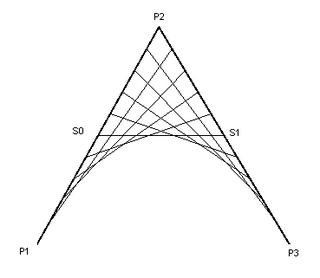
Here we have two main lines: from P1 to P2 and from P2 to P3, the curve is defined by a point in the line S0 to S1.
Using the parametric ecuation of the line I mentioned before, we can write S0 and S1 as:
S0(t) = P1(1-t) + P2 t
S1(t) = P2 (1-t) + P3 t
Then, the point on the bezier curve is defined as:
Q(t) = S0(1-t) + S1 t
Simplifying this (hocus phocus... and some mathematical mumbo jumbo) we get:
Q(t) = P1 (1 - t)^2 + P2 (2t(1-t)) + P3 (t^2)
So finally we have the basic ecuation for a quadratic bezier curve.
(Next: Curve intersection)
Wednesday, June 29, 2005
Have you ever felt entangled?
Have you ever felt entangled while writing some code? Maybe during a particular large refactoring?
Trying to make one more piece of information fit in your brain, while at the same time, keeping all the others in it's place?
Or that particular frustration of knowing there must be a simpler/faster/better way of doing something but being unable to find it?
Well... sometimes I do.
This blog hopefully will end up having my musings on these matters, some code samples for stuff that I find interesting or it took me a long time to figure out. Eventually you'll have to put up with some of my most eccentric dissertations, but I promise that I'll try to keep those to a minimum.
Trying to make one more piece of information fit in your brain, while at the same time, keeping all the others in it's place?
Or that particular frustration of knowing there must be a simpler/faster/better way of doing something but being unable to find it?
Well... sometimes I do.
This blog hopefully will end up having my musings on these matters, some code samples for stuff that I find interesting or it took me a long time to figure out. Eventually you'll have to put up with some of my most eccentric dissertations, but I promise that I'll try to keep those to a minimum.
First Post!
I hope this will be up and running shortly. In the meantime, you might want to check d2r which is a great blog.
Subscribe to:
Posts (Atom)