"My definition of an expert in any field is a person who knows enough about what's really going on to be scared." - P. J. Plauger, Computer Language, March 1983
From Stackoverflow.
"My definition of an expert in any field is a person who knows enough about what's really going on to be scared." - P. J. Plauger, Computer Language, March 1983
"The devil is in the details, but exorcism is in implementation, not theory." - (author unknown)
Writing multithreaded code is like juggling chainsaws; amazing when it works and truly sucky when it doesn't.
public class BufferedQueue {
    private LinkedList list;
    public BufferedQueue() {
        list = new LinkedList();
    }
    public Object consume() {
        Object value;
        atomic {
            if(list.isEmpty()) {
                retry;
            }
            value = list.removeFirst();
        }
        return value;
    }
    public void produce(Object value) {
        atomic {
            if(list.size() > 10) {
                retry;
            }
            list.add(value);
        }
    }
    public Object peek() {
        Object value;
        atomic {
            if(list.isEmpty()) {
                retry;
            }
            value = list.getFirst();
        } else {
            value = null;
        }
        return value;
    }
}
consume method.
public Object consume() {
    Object value;
    atomic {
        if(list.isEmpty()) {
            retry;
        }
        value = list.removeFirst();
    }
    return value;
}
Orientation and Acceleration
The orientation and acceleration is quite easy, it only needs an accelerometer. This only tells you the orientation relative to the ground (if you're swinging, the 'perceived' ground shifts).
Pointing
This is the hard part.
There are some observations I (and several others) made:
Keeping those in mind, let me explain how it all makes sense:
First of all, the dark window in the wii-mote, is a visible-light filter. Very similar to the window in front of most remote controls. But instead of having a IR led behind it, it has an image sensor.
This image sensor only 'sees' infrared images, probably in fairly low resolution. It uses this to see the sensor bar, which is basically a row of IR leds.
The wii-mote captures an image of what's in front of it (basically a bright line on a dark background), and looks for the sensor bar (which should be the brightest IR thing in the image).
Since the size of the sensor bar is fixed, you can acurately calculate the distance of the wii-mote from the sensor bar, the rotation (the image sensor sees a line rotated), and the angle of the wii-mote in relation to the center of the sensor bar (the line is off-center in the image).
This approach is quite easy to implement, but it has several drawbacks:
It also is very cost effective since low resolution image sensors are quite cheap in bulk, and image tracking is also very well understood for this scenario (think of optical mice, for example).
Hope you enjoyed this.
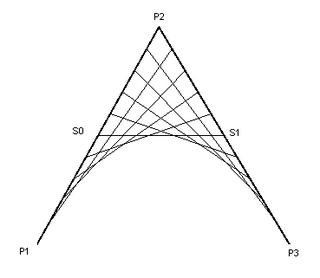
Where Qx(t) and Qy(t) are the parametric ecuations of the curve for each coordinate:
Qx(t) = Px1 (1 - t)^2 + Px2 (2t(1-t)) + Px3 (t^2)
Qy(t) = Py1 (1 - t)^2 + Py2 (2t(1-t)) + Py3 (t^2)
To perform the aforementioned checks, we must solve t for:
c = Q(t)
(since Qx(t) and Qy(t) are analogous, I won't specify which one I'm referring , since the result is the same).
That yields (after some more mathemagic passes):
(P1 - 2 P2 + P3)t^2 + (2 P2-2 P1) t + (P1 - c) = 0
Which is a simple quadratic equation. As you know, quadratic equations have (potentially) two roots. So we must check both values (if present) to see if any of those yields the expected result.
To solve it in code, we can use the handy QuadCurve2D.solveQuadratic() method.
public boolean curveIntersects(QuadCurve2D curve, double rx, double ry, double rw, double rh)
  {
      /**
       * A quadratic bezier curve has the following parametric equation:
       *
       * Q(t) = P0(1-t)^2 + P1(2t(1-t)) + P2(t^2)
       *
       * Where 0 <= t <= 1 and P0 is the starting point, P1 is the control point and
       * P2 is the end point.
       *
       * Therefore, the equations for the x and y coordinates are:
       *
       * Qx(t) = Px0(1-t)^2 + Px1(2t(1-t)) + Px2(t^2)
       * Qy(t) = Py0(1-t)^2 + Py1(2t(1-t)) + Py2(t^2)
       *
       *  0 <= t <= 1
       *
       * A bezier curve intersects a rectangle if:
       *
       *  1 - Either one of its endpoints is inside of the rectangle
       *  2 - The curve intersects one of the rectangles sides (top, bottom, left or right)
       *
       * The equation for a horizontal line is:
       *
       *   y = c
       *
       * The line intersects the bezier if:
       *
       *   Qy(t) = c and 0 <= t <= 1
       *
       * We can rewrite this as:
       *
       *   -c + Py0 + (-2Py0 + 2Py1)t + (Py0 - 2Py1 + Py2) t^2 == 0
       *   and 0 <= t <= 1
       *
       * We can use the valid roots of the quadratic, to evaluate Qx(t), and see if the value
       * falls withing the rectangle bounds.
       *
       * The case for vertical lines is analogous to this one.
       * (juancn)
       */
      double y1 = curve.getY1();
      double y2 = curve.getY2();
      double x1 = curve.getX1();
      double x2 = curve.getX2();

      //If the rectangle contains one of the endpoints, it intersects the curve
      if(rectangleContains(x1, y1, rx,ry,rw,rh)  rectangleContains(x2, y2,rx,ry,rw,rh)) {
          return true;
      }

      double eqn[] = new double[3];
      double ctrlY = curve.getCtrlY();
      double ctrlX = curve.getCtrlX();

      return intersectsLine(eqn, y1, ctrlY, y2, ry, x1, ctrlX, x2, rx, rx+rw) //Top
       intersectsLine(eqn, y1, ctrlY, y2, ry + rh, x1, ctrlX, x2,rx, rx+rw) //Bottom
       intersectsLine(eqn, x1, ctrlX, x2, rx, y1, ctrlY, y2, ry, ry+rh) //Left
       intersectsLine(eqn, x1, ctrlX, x2, rx+rw, y1, ctrlY, y2, ry, ry+rh); //Right
  }

  private boolean rectangleContains(double x, double y, double rx, double ry, double rw, double rh)
  {
      return (x >= rx &&
          y >= ry &&
          x < rx + rw &&
          y < ry + rh);
  }

  /**
   * Returns true if a line segment parallel to one of the axis intersects the specified curve.
   * This function works fine if you reverse the axes.
   *
   * @param eqn a double[] of lenght 3 used to hold the quadratic equation coeficients
   * @param p0 starting point of the curve at the desired axis (i.e.: curve.getX1())
   * @param p1 control point of the curve at the desired axis  (i.e.: curve.getCtrlX())
   * @param p2 end point of the curve at the desired axis (i.e.: curve.getX2())
   * @param c where is the line segment (i.e.: in X axis)
   * @param pb0 starting point of the curve at the other axis (i.e.: curve.getY1())
   * @param pb1 control point of the curve at the other axis  (i.e.: curve.getCtrlY())
   * @param pb2 end point of the curve at the other axis (i.e.: curve.getY2())
   * @param from starting point of the line segment (i.e.: in Y axis)
   * @param to end point of the line segment (i.e.: in Y axis)
   * @return
   */
  private static boolean intersectsLine(double[] eqn, double p0, double p1, double p2, double c,
                                 double pb0, double pb1, double pb2,
                                 double from, double to)
  {
      /**
       * First we check if a line parallel to the axis we are evaluating intersects
       * the curve (the line is at c).
       *
       * Then we check if any of the intersection points is between 'from' and 'to' in the other
       * axis (wether it belongs to the rectangle)
       */

      //Fill the coefficients of the equation
      eqn[2] = p0 - 2*p1 + p2;
      eqn[1] = 2*p1-2*p0;
      eqn[0] = p0 - c;

      int nRoots = QuadCurve2D.solveQuadratic(eqn);
      boolean result;
      switch(nRoots) {
      case 1:
          result = (eqn[0] >= 0) && (eqn[0] <= 1);
          if(result) {
              double intersection = evalQuadraticCurve(pb0,pb1,pb2,eqn[0]);
              result = (intersection >= from) && (intersection <= to);
          }
          break;
      case 2:
          result = (eqn[0] >= 0) && (eqn[0] <= 1);
          if(result) {
              double intersection = evalQuadraticCurve(pb0,pb1,pb2,eqn[0]);
              result = (intersection >= from) && (intersection <= to);
          }

          //If the first root is not a valid intersection, try the other one
          if(!result) {
              result = (eqn[1] >= 0) && (eqn[1] <= 1);
              if(result) {
                  double intersection = evalQuadraticCurve(pb0,pb1,pb2,eqn[1]);
                  result = (intersection >= from) && (intersection <= to);
              }
          }

          break;
      default:
          result = false;
      }
      return result;
  }

  public static double evalQuadraticCurve(double c1, double ctrl, double c2, double t)
  {
      double u = 1 - t;
      double res = c1 * u * u + 2 * ctrl * t * u + c2 * t * t;

      return res;
  }